ATS resume tips for 2026: get read before you get rejected.
In 2026, software decides whether a human ever sees your resume. This guide gives you the exact format, keywords, and fixes that pass the scan, including the two design traps (Canva templates and photos) that quietly sink thousands of strong candidates.
Your resume has two readers. Only one is human.
Before a recruiter spends six seconds on your resume, a parser extracts it into plain text and ranks it. A design that dazzles a person can collapse into nonsense for the machine.
What a human sees
A polished two-column layout with a headshot, skill bars, icons, and colour blocks. It looks professional on screen and feels ready to send.
What the ATS extracts
Scrambled text: job titles merged with skills, contact details missing from the header region, image data discarded, name field empty, keyword match score low.
What an ATS actually does before you get a call.
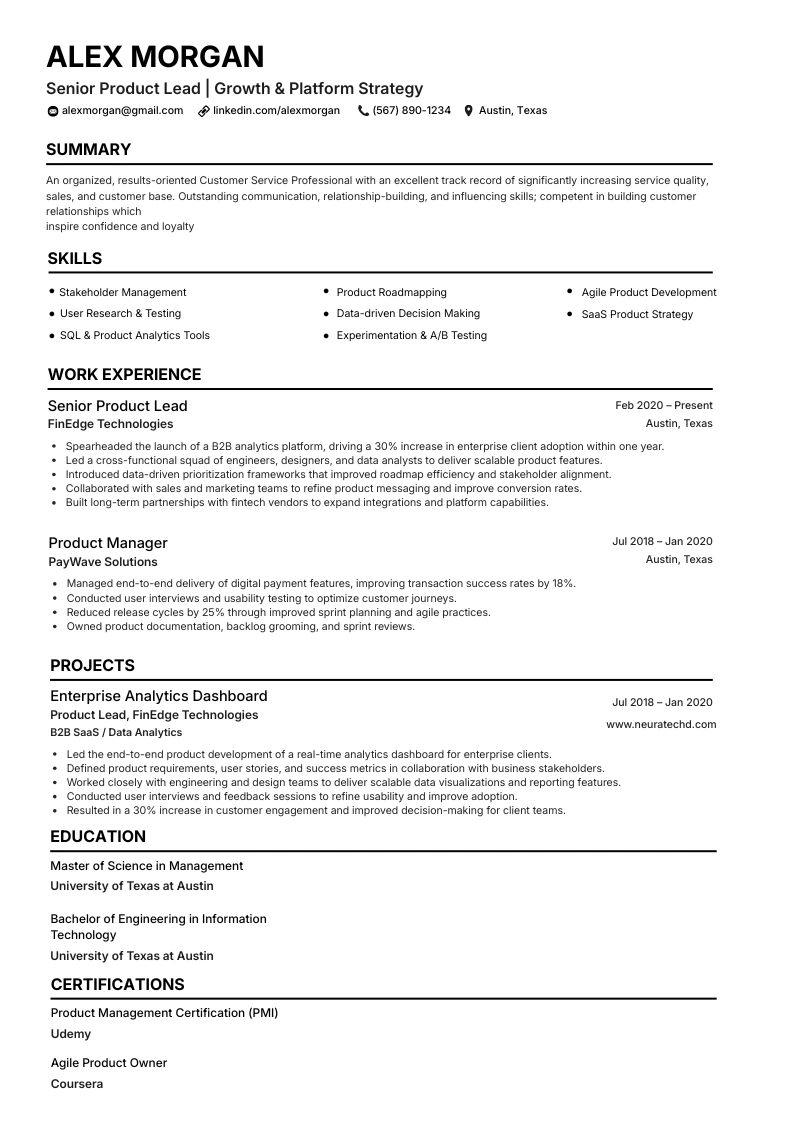
To pass an ATS in 2026, use a single-column resume with standard section headings, system fonts, and plain text. No photos, icons, tables, or multi-column Canva layouts. Mirror exact keywords from the job description, keep contact details out of headers and footers, and export as a text-based PDF or .docx. Test by copy-pasting into a plain text editor: if it reads in order, the bots can read it too.
If you applied for jobs three years ago and you are applying again now, the rules have shifted under your feet. Recruiters are facing a volume tsunami of AI-assisted applications, hiring has tilted toward skills over job titles, and applicant tracking systems have become the first gatekeeper for the overwhelming majority of roles. The good news: the system is learnable, and once you understand what the parser is doing, an ATS-friendly resume is genuinely straightforward to build.
An applicant tracking system (ATS) is software employers use to collect, scan, and rank incoming resumes. Most medium and large companies rely on one to manage thousands of applications. According to Jobscan, 99% of Fortune 500 companies use an ATS. Industry trackers now put the share of employers using some form of automated screening above 90%.
The crucial thing to understand is that the software does not read your resume the way a person does. It parses the document into raw text, identifies which chunks are your name, contact details, experience, education, and skills, then matches that against the job requirements and ranks you relative to everyone else. If your formatting confuses that extraction step, the system can misfile or simply drop your most important information. You will never be told. The status just sits at under review.
You will see the claim that around 75% of resumes never reach a human. That specific number is debated and worth treating with healthy skepticism. But the underlying mechanic is not in dispute: most applications are filtered and ranked by machine first, and a resume that parses badly or misses the right terms sinks in the queue. Even when you clear the parser, Ladders eye-tracking research suggests a recruiter spends only six to seven seconds on that first human look. Your resume has to win both readers.
3 resume design traps that fail ATS in 2026.
They look fine to you. The parser reads them differently. Scan the table first, then open the trap that matches your resume.
| Trap | What you see | What the ATS extracts | Fix |
|---|---|---|---|
| 1 · Canva templates | Polished layout, colours, icons | Scrambled text order | Single-column, text-only |
| 2 · Resume photo | Professional headshot | Image discarded · bias risk | Photo on LinkedIn only |
| 3 · Two-column layout | Skills sidebar + main body | Columns merged into nonsense | One column only |
Trap 1 · Canva and design-tool templates
Your resume looks finished. The ATS reads job titles and skills in the wrong order. Most popular Canva exports use text boxes, columns, icons, and graphics. Independent testing found roughly 72% fail basic parsing.
The 2-minute Canva test
Select all text in your resume (Cmd/Ctrl + A), copy, and paste into Notepad. If your name, titles, and skills come out scrambled or missing, that is exactly what the ATS sees. If it is garbled, the resume is not ready.
Trap 2 · Resume photos
Skip the photo on the CV for US, UK, and Canada applications. A headshot wastes prime space, introduces bias risk, and embedded images can break text extraction. A reported 43% of ATS rejections trace back to formatting issues like this.
Use the LinkedIn bridge instead
Leave the photo off the resume and put a strong headshot on your LinkedIn profile. Recruiters look you up there anyway. Exceptions: Germany, Japan, and on-camera roles where a photo is expected.
Trap 3 · Two-column and sidebar layouts
Sidebars do not stay on the side. Parsers read top-to-bottom in one stream and merge your sidebar with the main column. Job titles, dates, and skills end up scrambled into nonsense.
Not sure if your resume parses cleanly?
Upload it and get an instant ATS score with the exact fixes. No rebuild required.
The 2026 ATS-friendly formatting rules.
Once you have removed the big traps, the format itself is simple and stable. Jobscan's 2026 ATS checklist and the broader testing community largely agree on the following.
Both PDF and Word can work in 2026. The deciding factor is whether the text is selectable. A text-based PDF preserves your layout and is accepted by most modern parsers. A .docx is the safest fallback for older systems. The one format to never use is a flattened image export. There is no extractable text, so the ATS sees nothing.
The best-performing layout in 2026 testing is a single-column hybrid format: a three-line professional summary, then a skills section, then reverse-chronological work experience. This structure parses at 95 to 99 percent accuracy across Workday, Greenhouse, Lever, Taleo, and iCIMS, the five platforms handling roughly 80 percent of US enterprise hiring.
| Element | ATS-safe | Risky / avoid |
|---|---|---|
| Columns | Single column | 2 - 3 columns, sidebars |
| Contact info | In body, plain text | In header/footer |
| Visuals | Text only | Photos, icons, charts |
| Headings | Standard (Experience) | Creative labels |
| File type | Text-based PDF or .docx | PNG/JPG image export |
| Fonts | Arial, Calibri, Georgia | Decorative fonts |
Skills-first keywords: tailor, don't stuff.
Passing the parser gets you read. Keywords get you ranked. 2026 hiring has shifted toward skills over titles, which means the system matches your resume against specific competencies in the job description.
Mirror exact job-description wording
If they ask for stakeholder management, use that phrase rather than a synonym. Many parsers match literally. Spell out acronyms once: Project Management Professional (PMP). Include both forms to maximise keyword matches across different parsers.
Do not try to game the system
Hidden white-text keywords and stuffed keyword dumps are easy for modern systems and recruiters to catch. Weave terms into achievement bullets with numbers, which serves both the ranking algorithm and the human skim.
Cover hard and soft skills together. Tools and technical abilities, plus human capabilities AI cannot replace. With AI competency requirements in postings rising in 2026, things like conflict resolution, ethical judgment, and complex leadership stand out precisely because they cannot be automated.
NeuraCV's JD-to-CV tool mirrors 10 to 15 role keywords from any posting automatically, so you are not guessing which terms the parser weights highest. Put keywords in context inside real achievement bullets: cut onboarding time 40%, lifted retention 12%, reduced ticket backlog by 200 per month.
After the bots: winning the 6-second human scan.
Passing the parser only earns you the next test. Once your resume surfaces in the recruiter's ranked queue, a person gives it that famous six-to-seven-second glance before deciding whether to read on. A resume can be perfectly ATS-safe and still fail here if the content is flat.
Front-load the top third. Eye-tracking studies consistently show recruiters anchor on the top of the page first. Put a tight professional summary, your most relevant title, and one or two standout achievements where the eye lands, rather than burying them under a generic objective statement.
Lead bullets with outcomes, not duties. Responsible for managing the onboarding process tells a skimmer nothing. Cut new-hire onboarding from 14 days to 8 and lifted 90-day retention 12% gives them a number to grab in a fraction of a second. Strong verbs plus a metric satisfies both readers at once.
Make the hierarchy obvious. Bold job titles, clear date ranges, and generous white space let a recruiter trace your career path without effort. Keep most resumes to a single page. Two pages only if you have the senior experience to justify it.
AI can format the structure and surface keywords, but you know which two achievements prove you can do this job. Choosing them well is what turns a parsed document into an interview.
Two forces are reshaping the 2026 job hunt at once. On the employer side, screening is increasingly AI-assisted. On the candidate side, AI tools let applicants apply faster and in greater volume. Let AI handle mechanical work while you supply judgment: which achievements matter, which roles are worth tailoring for, and the human strengths that make you more than a keyword match.
Four disciplined steps to a parser-safe CV.
Work through the four steps below in order. You will end up with a parser-safe, recruiter-ready CV that copies out of a PDF cleanly.
Audit the layout
Scan for two-column structures, photos, tables, text boxes, decorative graphics and non-standard headings. Flag every one before you rewrite a word.
Strip decorative elements
Delete skill bars, colour blocks, background shapes, ornamental fonts, and personal data like DOB or references on the resume itself.
Rewrite for keywords
Add a two-to-three-line summary, mirror 10 to 15 role keywords from the posting, and turn every duty bullet into a measurable outcome.
Validate with ATS
Upload the PDF to NeuraCV's free ATS checker. Confirm parse rate, missing keywords and field extraction before you submit.
The three disciplines every CV needs to survive and convert.
Group your rewrite into three clusters. Layout keeps you parseable, content earns the interview, hygiene prevents the stupid rejections that still cost applications in 2026.
Layout & Structure
- Single-column body with linear flow
- Standard headings (Summary, Experience, Education, Skills)
- Reverse chronological order for experience
- No tables, text boxes or floating elements
- Consistent date formatting throughout
- Export as PDF with selectable text
Content & Keywords
- Two- to three-line professional summary
- Action verbs, not duty descriptions
- Measurable outcomes on every bullet
- 10 to 15 role keywords from the posting
- Skills grouped by category, plain text
- Acronyms spelled out on first use
ATS Hygiene
- No photo, no headshot, no avatar
- No skill bars, dot ratings or percentage charts
- No decor graphics, colour blocks or backgrounds
- No date of birth, licence or marital status
- No references or referee emails on the CV
- System fonts only (Arial, Calibri, Georgia)
Five ATS myths that still cost interviews.
Stop guessing. Start shipping CVs that parse.
Free. No credit card. ATS-tested across Workday, Greenhouse, Lever, Taleo, iCIMS and NHS Jobs.
Straight answers about ATS resume tips in 2026.
Is a Canva resume ATS-friendly?
Should I put a photo on my resume in 2026?
Is PDF or Word better for an ATS?
How do I check if my resume is ATS-friendly?
Do ATS systems really reject most resumes?
Is a two-column resume bad for an ATS?
What fonts work best for an ATS resume?
Can AI write an ATS-friendly resume for me?
More NeuraCV guides for shipping parser-safe CVs.
Keep going on the ATS-first path with these companion guides and free tools from the NeuraCV editorial team.
